For aviation photographers

Never miss a plane crossing the moon again.

LunAir is a web app that predicts when an aircraft will pass in front of the moon from your location — built for aviation photographers and planespotters. It watches the sky from your exact coordinates and alerts you the moment a plane is about to fly past the moon. Set your coordinates once. Catch the shot you've been chasing.

Live ADS-B Real-time flight data
0.01° moon math Astronomical-grade precision
Pre-transit countdown Time to set up your shot
FLIGHTAA92
ALT10,670 m
SEPARATION0.8°
TRANSIT IN 2M 14S
The moment

From notification to photograph. In minutes.

You get an alert when an aircraft is on a trajectory to pass close to the moon as seen from where you are. You step outside with your camera. You wait for the moment. You take the shot.

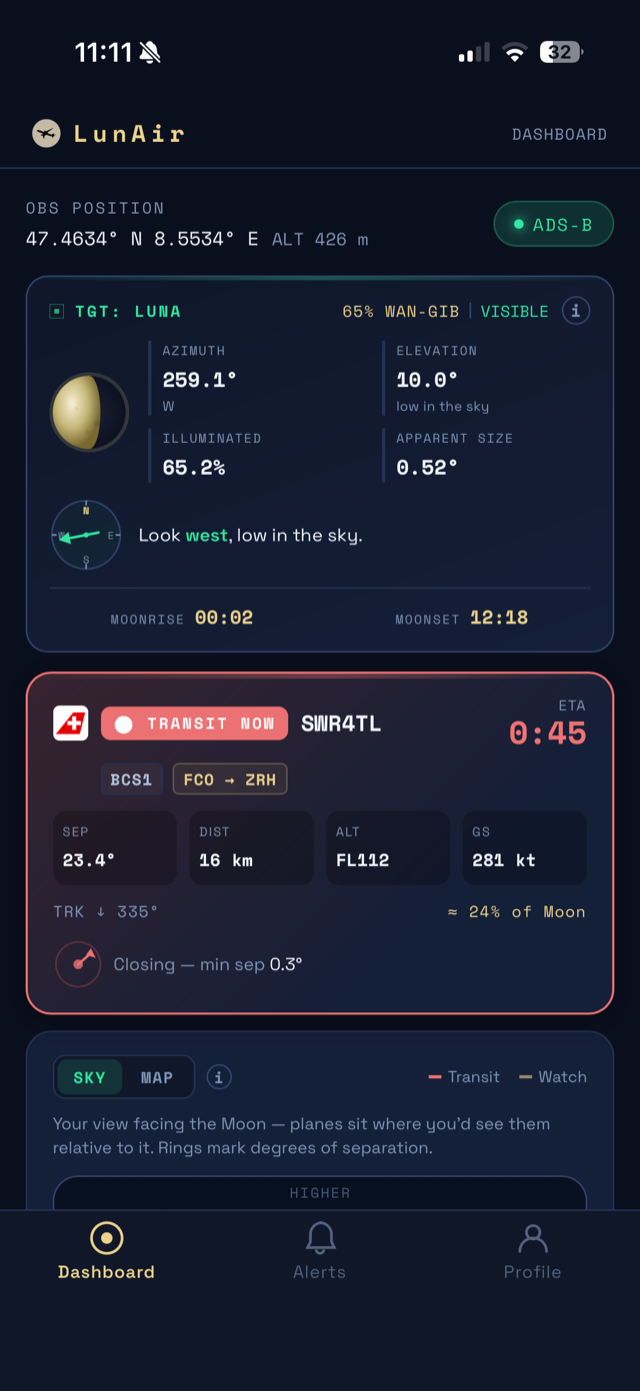
LunAir dashboard showing a live transit alert: Swiss flight SWR4TL about to cross the moon, minimum separation 0.3°
The LunAir dashboard — live over Zürich
Aircraft transiting the moon
EXAMPLE SHOT
PHOTO BY EMILIO GARCIA / UNSPLASH
How it works

Three steps. One unforgettable shot.

01 — Set up

Set your location

Drop a pin on the map or use your current GPS coordinates. LunAir uses your exact viewpoint to compute where the moon and every nearby aircraft sit in your sky.

02 — Watch

Get instant alerts

The app continuously polls live ADS-B flight data and predicts trajectories up to 6 minutes ahead. The moment a transit is likely, you get a push notification with everything you need.

03 — Capture

Take the shot

Point your camera at the precise azimuth and elevation in the alert. Wait. Capture an image you couldn’t plan for in any other way.

The shot every aviation photographer wants is almost impossible to plan for. We built the tool that finally makes it possible.
— The founder of LunAir
Features

Built for photographers who’ve been waiting years.

Everything you need to catch transits the moment they happen.

Moon transit alerts

Know the second any aircraft is about to fly past the lunar disk from your viewpoint.

Live ADS-B data

Real-time positions from multiple global flight-tracking networks, refreshed every few seconds. No delay, no guessing.

Astronomical precision

Moon position computed to better than 0.01°. 6-minute prediction window so you have time to set up.

Push notifications

Phone in your pocket? You’ll still know. Native push to iOS and Android, even when the app is closed.

Pro

Multiple locations

Save up to 5 spots — your home, your favourite shooting location, the airport viewing area.

Pro

Detailed shot setup data

Exact azimuth, elevation, aircraft altitude, speed and heading — everything you need to nail the framing.

Pro
Pricing

Free to start. Pay only when you’re ready.

The free tier is genuinely useful — real alerts, real data, no credit card. Upgrade when you’re ready for push notifications and the full experience.

Free
$0 / forever
Get started, no credit card needed.
  • Moon transit alerts
  • One saved location
  • In-app notifications
  • 6-minute prediction window
  • Live ADS-B flight data
  • Push notifications
  • Multiple saved locations
Start free
Coming next

More features in the pipeline.

We’re working on rare aircraft watchlists (track A380s, military, specific registrations), sun transit alerts for daytime shots, and weather-aware filtering. Be the first to know when these launch.

Rare aircraft watchlist Get notified when an A380, military, or any aircraft you specify flies within range.
Sun transit alerts Daytime aircraft transits across the sun — equally striking, available every day.
Weather-aware filtering Only get alerts when local cloud cover is low enough to actually see the shot.

No spam. Just a single email when each feature ships.

Questions

Things people ask.

What exactly is a moon transit?
A transit is when an aircraft passes directly in front of the moon as seen from your specific location on Earth. The moon is only ~0.5° wide in the sky, so from any single viewpoint these moments are rare and brief — typically lasting less than a second.
How often will I actually get alerts?
It depends on your location. If you live under a busy airway or near a major airport, you might see several transit-worthy alerts every week — sometimes even 5–10 per day. (We do, from central Europe.) Quieter areas may see one or two per month. Most users find the frequency matches the rhythm of their hobby. Not sure if your spot has enough traffic? The free tier costs nothing — set your location and find out.
How much lead time do I get before a transit?
Up to 6 minutes — the length of the prediction window — depending on aircraft speed and altitude. That's enough time to grab your camera, set up a tripod, and confirm your framing. Push notifications on the Pro plan give you that warning even when the app isn't open.
Does it only work with the full moon?
No — LunAir tracks transits across every moon phase, day or night. Full and gibbous phases are most spectacular for photography because the lit surface provides contrast for aircraft silhouettes, but crescents and even daytime transits can produce striking shots.
How accurate are the alerts?
Moon position is computed to better than 0.01°, and live ADS-B data places aircraft within ~0.4° at typical viewing distances. We default to a 1.5° alert threshold — close enough for spectacular shots, generous enough to absorb prediction error. One honest caveat: aircraft sometimes change course mid-prediction, so an alert can disappear before the transit happens. It's the nature of predicting moving objects, and we're constantly working to improve it.
Where does the flight data come from?
We pull live ADS-B transponder data from several global flight-tracking networks and pick whichever gives us the best coverage where you are. Worldwide reach, automatically optimized for your location.
What camera gear do I need?
More than you'd think, and less than you'd fear. Serious results typically come from a 400mm equivalent telephoto lens or longer on a tripod, with exposure similar to standard moon photography (around f/8, 1/2000s, ISO 200 in daylight). But you don't need to start there — modern smartphones with telephoto lenses (iPhone 15 Pro and newer, Samsung Galaxy S24 Ultra, Pixel 8 Pro) can absolutely capture transits too. We put together a full guide on gear, settings, and technique for both setups if you want to go deeper.
What's the difference between Free and Pro?
Free gives you one saved location and in-app notifications — enough to see what LunAir can do. Pro adds push notifications (so you don't miss alerts when the app is closed), multiple saved locations, and detailed flight data for every prediction. Pro is $5/month or $50/year with a 14-day free trial.
Can I cancel anytime?
Yes — paid plans cancel instantly with no fees. You keep access through the end of your billing period and revert to the free tier afterward. No emails, no friction.
How do I install LunAir? Is it in the App Store?
LunAir is a Progressive Web App that installs to your home screen — no App Store needed.

iPhone (Safari): Open app.lunairapp.com, tap the Share button , and choose "Add to Home Screen."

Android (Chrome): Open the menu and select "Install app."

Once installed, LunAir launches full-screen and delivers push notifications like any native app. A dedicated App Store version may come later.
Do you share or sell my data?
No. LunAir is built and operated by a single founder, not a data company. We only store the information needed to run the service: your account email, your saved location, and your subscription status. Nothing else is shared with anyone. See our privacy policy for the full details.

New to moon transit photography? Read the guide →

Start tracking

The next transit is already on its way.

It’s free to start, takes 30 seconds to set up, and tonight’s moon is already on the move.

Open LunAir